Roblox Scripts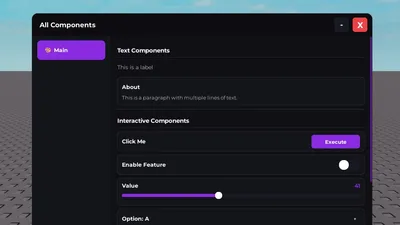
Credits: Zontraz
🎯 Features🎨 3 Built-in Themes – Dark, Light, and Midnight📱 Fully Responsive – Works perfectly on mobile, tablet, and desktop🎮 Touch Support – Native touch controls for mobile devices💾 Config System – Save and load your settings🔧 14 Core Components – Label, Section, Paragraph, Divider, Button, Checkbox, Toggle, Slider, Dropdown, Textbox, ProgressBar, Keybind, ColorPicker, Search⚡ Notifications & Prompts – Built-in user feedback system🌈 Custom Themes – Create your own themes with 13 color properties🌈 Rainbow Mode – Animated rainbow borders and effects🔑 Flag System – Easy access to component values📋 Clipboard Support – Works across all executors⚙️ Auto-Detection – Automatically detects and adapts to your executor🖼️ Enhanced Icons – Emoji and image icons for Window & Tabs✅ Checkboxes – Simple toggle controls📑 SubTabs – Organize content with tabs within tabs (ALL 14 components supported)📦 GroupBoxes – Group UI elements together (ALL 14 components supported)📏 Spacing Control – Add custom spacing between elements➡️ In-line Layout – Place elements side-by-side🔄 Nested GroupBoxes – GroupBox inside GroupBox support🔍 Advanced Search – Real-time search with history and highlighting🔲 Minimize Modes – “collapse” or “shrink” window minimize options
--[[
Documentation: https://zon.su/zonix
GitHub: https://github.com/Zontrz/zonix-ui
]]--

local Zonix = loadstring(game:HttpGet("https://raw.githubusercontent.com/Zontrz/zonix-ui/refs/heads/main/main.lua"))()
local Window = Zonix:Window({ Name = "All Components" })
local Tab = Window:Tab({ Name = "Main", Icon = "🎨" })

Tab:Section("Text Components")
Tab:Label("This is a label")
Tab:Paragraph("About", "This is a paragraph with multiple lines of text.")
Tab:Divider()

Tab:Section("Interactive Components")
Tab:Button({ Name = "Click Me", Callback = function() print("Clicked") end })
Tab:Toggle({ Name = "Enable Feature", Flag = "Feature" })
Tab:Slider({ Name = "Value", Min = 0, Max = 100, Flag = "Value" })
Tab:Dropdown({ Name = "Option", Options = {"A", "B", "C"}, Flag = "Option" })
Tab:Textbox({ Name = "Input", Placeholder = "Type...", Flag = "Input" })
Tab:Keybind({ Name = "Hotkey", Default = Enum.KeyCode.E, Flag = "Hotkey" })
Tab:ColorPicker({ Name = "Color", Flag = "Color" })
Tab:Divider()

Tab:Section("Utility Components")
Tab:CopyButton({ Name = "Copy URL", Text = "https://hub.zon.su" })
Tab:ProgressBar({ Name = "Progress", Progress = 0.75 })
Comments section coming soon...
To use this script, you need a Roblox Executor. Simply copy the script from this page, paste it into your executor, and run it while you are in the Universal game.
This script may require a payment or subscription. Please check the script's description for more details.
Yes, this script has a key system. You may need to complete a task or join a Discord server to get a key.
Yes, this script is designed to be compatible with mobile executors.