Roblox Scripts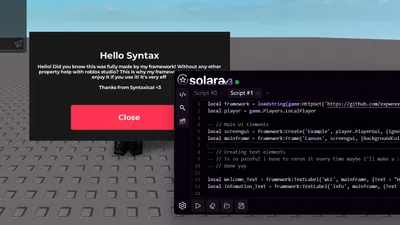
Credits: syntaxical
Hello! This is a powerful Roblox GUI framework built to help developers write cleaner and more optimized scripts. It improves structure, reduces clutter, and makes your Roblox projects easier to maintain, customize, and scale over time.
local framework = loadstring(game:HttpGet('https://github.com/xxpwnxxx420lord/Scripts/blob/main/framework.lua?raw=true', true))()
local player = game.Players.LocalPlayer

-- // Main UI Elements
local screengui = framework:Create('Example', player.PlayerGui, {IgnoreGuiInset = true, ResetOnSpawn = false})
local mainframe = framework:Frame('Canvas', screengui, {BackgroundColor3 = Color3.fromRGB(25,25,25), AnchorPoint = Vector2.new(.5,.5), Position = UDim2.new(0.5,0,0.5,0), Size = UDim2.new(0.360, 0, 0.378, 0), Visible = true})

-- // Creating text elements
-- // Ts so painful i have to rerun it every time maybe I'll make a :Close() subcommand
-- // Done yay

local Welcome_Text = framework:TextLabel('WLC', mainframe, {Text = "Hello "..game.Players.LocalPlayer.DisplayName, TextScaled = false, BackgroundTransparency = 1, RichText = true, TextColor3 = Color3.fromRGB(245,245,245), TextSize = 30, Position = UDim2.new(0.026, 0,0.060, 0), Size = UDim2.new(0.945, 0,0.307, 0), Font = Enum.Font.GothamBold})
local Infomation_Text = framework:TextLabel('Info', mainframe, {Text = "Hello! Did you know this was fully made by my framework! Without any other property help with roblox studio? This is why my framework rules I hope you enjoy it if you use it! It's very eff \n \n Thanks from Syntaxical <3", Position = UDim2.new(0.026, 0, 0.294, 0), Size = UDim2.new(0.945, 0, 0.307, 0), TextColor3 = Color3.fromRGB(245,245,245), TextSize = 15, TextWrapped = true, BackgroundTransparency = 1, Font = Enum.Font.GothamBold, TextXAlignment = Enum.TextXAlignment.Center, TextYAlignment = Enum.TextYAlignment.Top, TextScaled = false})

local close_button = framework:TextButton('Close', mainframe, {Text = "Close", Size = UDim2.new(0.581, 0, 0.23, 0), Position = UDim2.new(0.206, 0, 0.671, 0), TextScaled = false, TextSize = 25, BackgroundColor3 = Color3.fromRGB(255,51,82), TextColor3 = Color3.fromRGB(245,245,245), Font = Enum.Font.GothamBold})

-- // Graphical Changes

-- // local padding = framework:UIPadding('Padding', Infomation_Text, {PaddingBottom = UDim.new(0, 0), PaddingLeft = UDim.new(0, 20), PaddingRight = UDim.new(0, 0), PaddingTop = UDim.new(0, 5)})
-- ^^ Example, Its just padding makes it look bad

local Close_button_ui_corner = framework:UICorner('UiCorner', close_button, {CornerRadius = UDim.new(0,5)})

-- // Scripting
-- // Because the framework returns the Instance you can use it for scripting

close_button.MouseButton1Click:Connect(function()
	framework:Close(screengui)
end)

-- // Enjoy you can also look at the source code for help
Comments section coming soon...
To use this script, you need a Roblox Executor. Simply copy the script from this page, paste it into your executor, and run it while you are in the Universal game.
This script may require a payment or subscription. Please check the script's description for more details.
Yes, this script has a key system. You may need to complete a task or join a Discord server to get a key.
Yes, this script is designed to be compatible with mobile executors.